Apple Intelligence in iOS 27: all the new features (beyond Siri)

Index
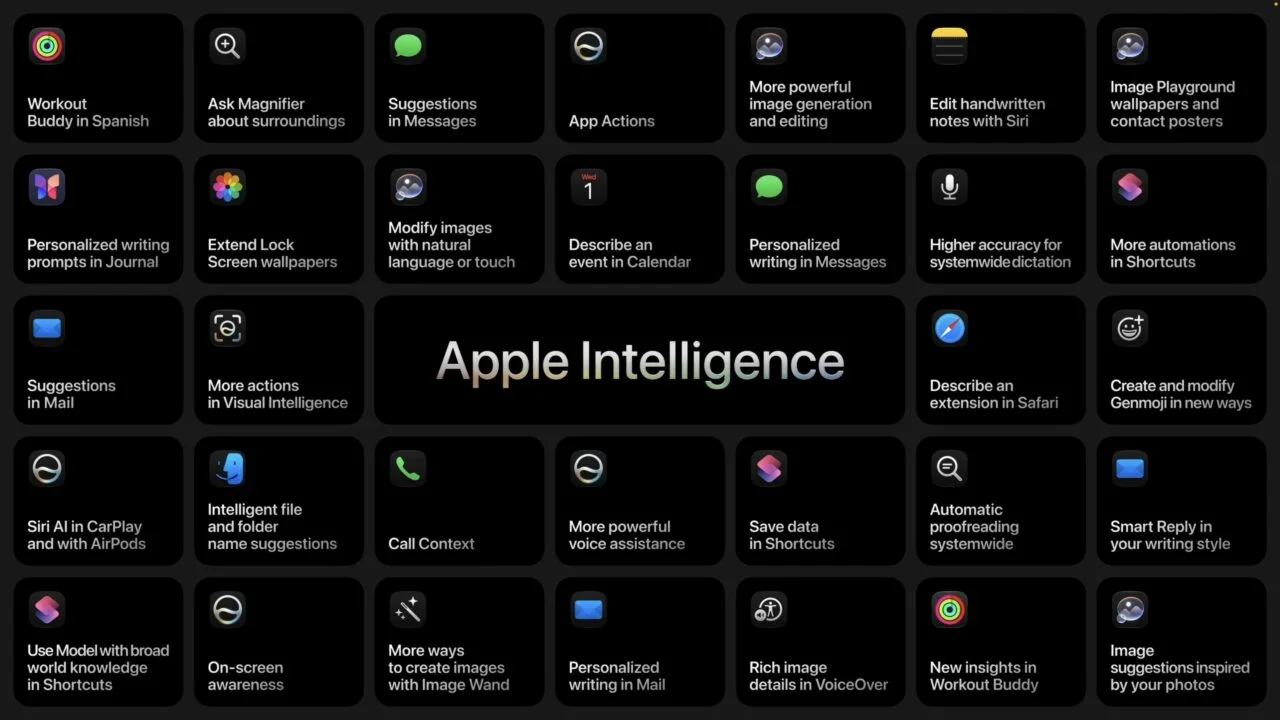
At WWDC 2026, Siri took all the headlines. But the new Siri is only the visible face of Apple Intelligence, the artificial intelligence layer Apple has built into almost every system app. The features you will use every day — editing a photo, generating an image, writing an email, automating a task — are spread across Photos, Messages, Shortcuts, Wallet, and the rest of iOS 27. And behind much of that intelligence is a company that is not Apple.
Apple Intelligence is not Siri
It is worth separating two things that coverage often blends together. Siri AI is the assistant: the ground-up rebuild that can converse, act across apps, and answer open-ended questions, with its own catalog of features and requirements. Apple Intelligence is the AI platform underneath, the one that powers everything else: photo editing, image generation, text correction, automations. Siri uses Apple Intelligence, but Apple Intelligence is much more than Siri.
The distinction matters because many of these features arrive without waiting for the Siri beta and work in more languages. These are the new features distributed throughout the system.
Images: editing, generation, and Genmoji
The most visible part of Apple Intelligence is how it creates and modifies images.
Photos adds generative editing
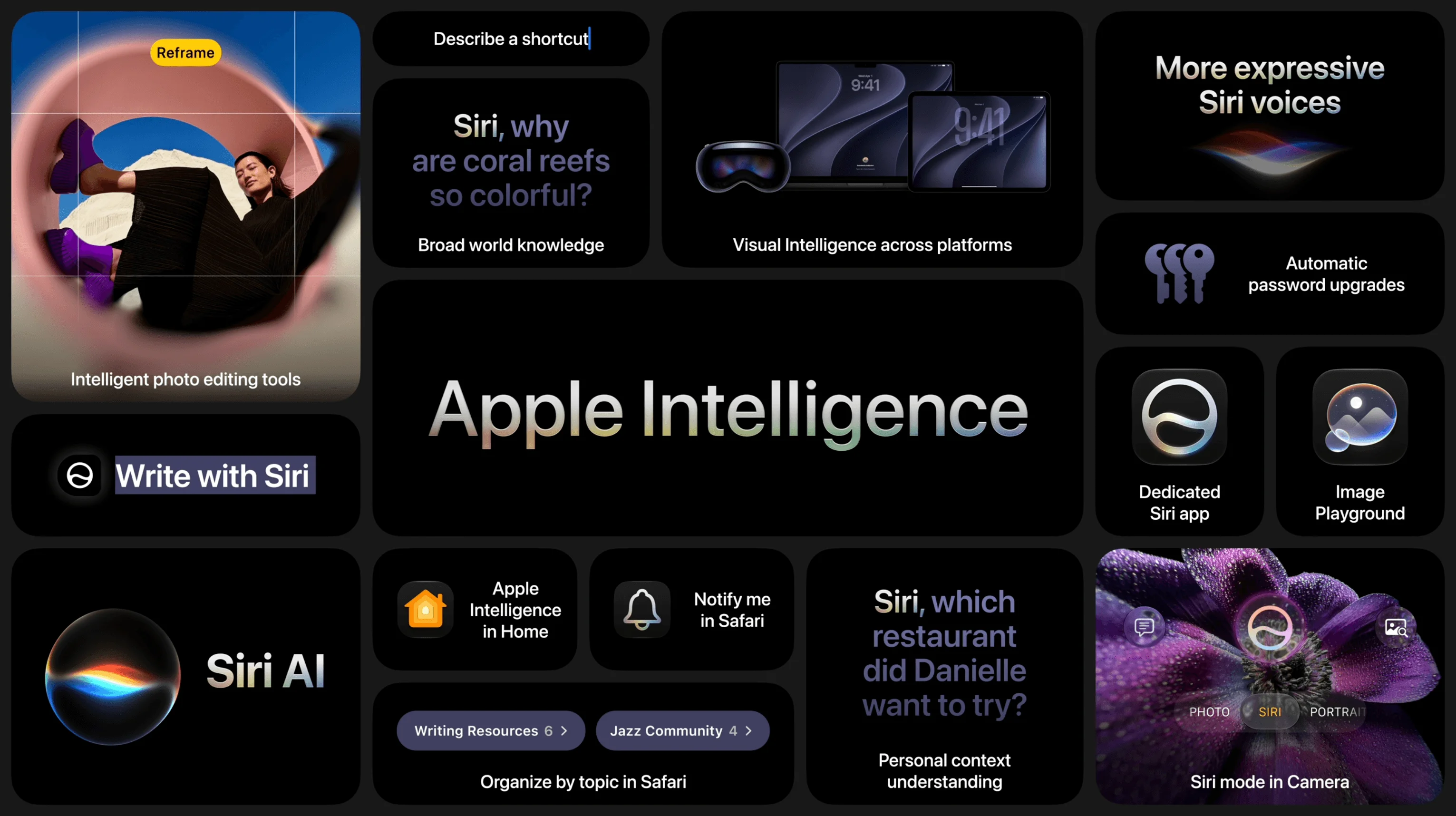
The Photos app adds tools that reconstruct parts of an image with AI. Clean Up improves object removal with more realistic results in complex scenes. Extend enlarges the edges of a photo by generating the background the camera did not capture, with a limit of 25% per side. And Spatial Reframing — the button is called Reframe — changes the perspective of a photo that has already been taken, as if you had moved the camera, using AI to fill in what appears from the new angle. These tools have their own in-depth analysis because they are the most sensitive new feature in iOS 27.
Image Playground now does photorealism
Until iOS 26, Image Playground only generated illustrations and animations. In iOS 27 it produces photorealistic images, edits generated images by typing what you want to change, lets you tap or brush over objects to move them, and lets you choose the aspect ratio before generating. It also creates wallpapers and Contact Posters. Generation runs on Private Cloud Compute servers, with daily usage limits; iCloud+ subscribers get a higher cap.
Editable Genmoji
Genmoji gets a quality jump and a practical change: now you describe an adjustment to an existing Genmoji and it updates, instead of generating a new one from scratch. Battery drain and heat while generating them are also lower. The default style is still the 3D cartoon-like look, with a sketch option.
Writing across the system
Writing Tools now works through Siri AI, so you can generate, rewrite, and proofread text almost anywhere you type, including most third-party apps. The most thoughtful new feature is Smart Reply: in Mail and Messages, suggested replies imitate your writing style with each person. If you send your boss short bullet points, Siri writes that way; if you write casually to your friends, it adapts. Mail suggestions can also trigger actions in third-party apps.
Visual Intelligence moves beyond the iPhone
Visual Intelligence — the feature that lets the camera identify and act on what it sees — was exclusive to the iPhone in iOS 26. In iOS 27 it expands across the entire ecosystem: on the iPhone it appears as a Siri mode inside the Camera app; on the iPad it is integrated into screenshots; on the Mac it is activated with a keyboard shortcut; and on the Vision Pro, you only need to look at an object or a window to ask Siri about it.
The new actions are specific. You can point the camera at a dish and get nutritional information, scan a nutrition label directly into the Health app, or move the details from a business card into Contacts. Splitting a bill with Apple Cash based on what the camera sees, however, is limited to the United States.
Shortcuts that write themselves
Shortcuts adds natural-language creation: you describe what you want the shortcut to do, and Apple Intelligence builds the flow of steps without making you configure them manually. You refine it by describing changes, and the app updates it. It works, for example, to set the morning alarm based on the first calendar event for the next day, or to arrange windows when the iPad connects to a keyboard.
Wallet, Safari, and the rest of the system
Wallet debuts Create a Pass: you tap the add button, choose to create a pass, and scan the barcode or QR code from any physical card to turn it into a digital pass. There are templates for memberships, events, and standard passes, with editable fields. Automatic scanning requires the Siri AI beta; manual entry works without it.
The rest of the apps add targeted but useful features:
- Safari organizes open tabs by topic, monitors a page with Notify Me and alerts you when it changes, and lets you describe and generate a custom extension.
- Passwords detects weak or compromised passwords and updates them with AI: it logs into the account, changes the password, and saves it.
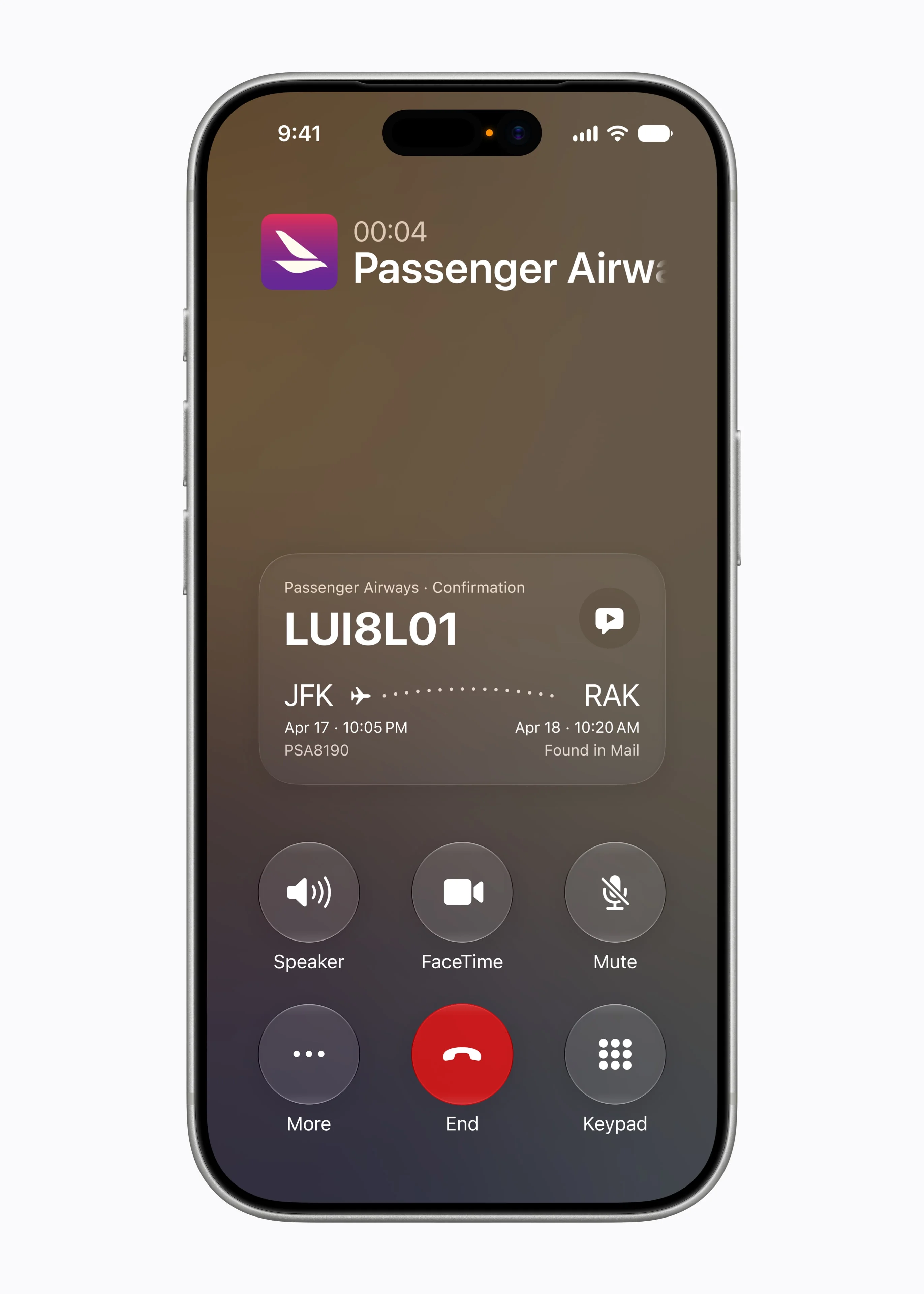
- Phone adds Call Context: when calling certain contacts, it shows relevant information from your email and messages, such as a flight confirmation code when calling the airline. It works on-device and is based on who you call, not on what you say.
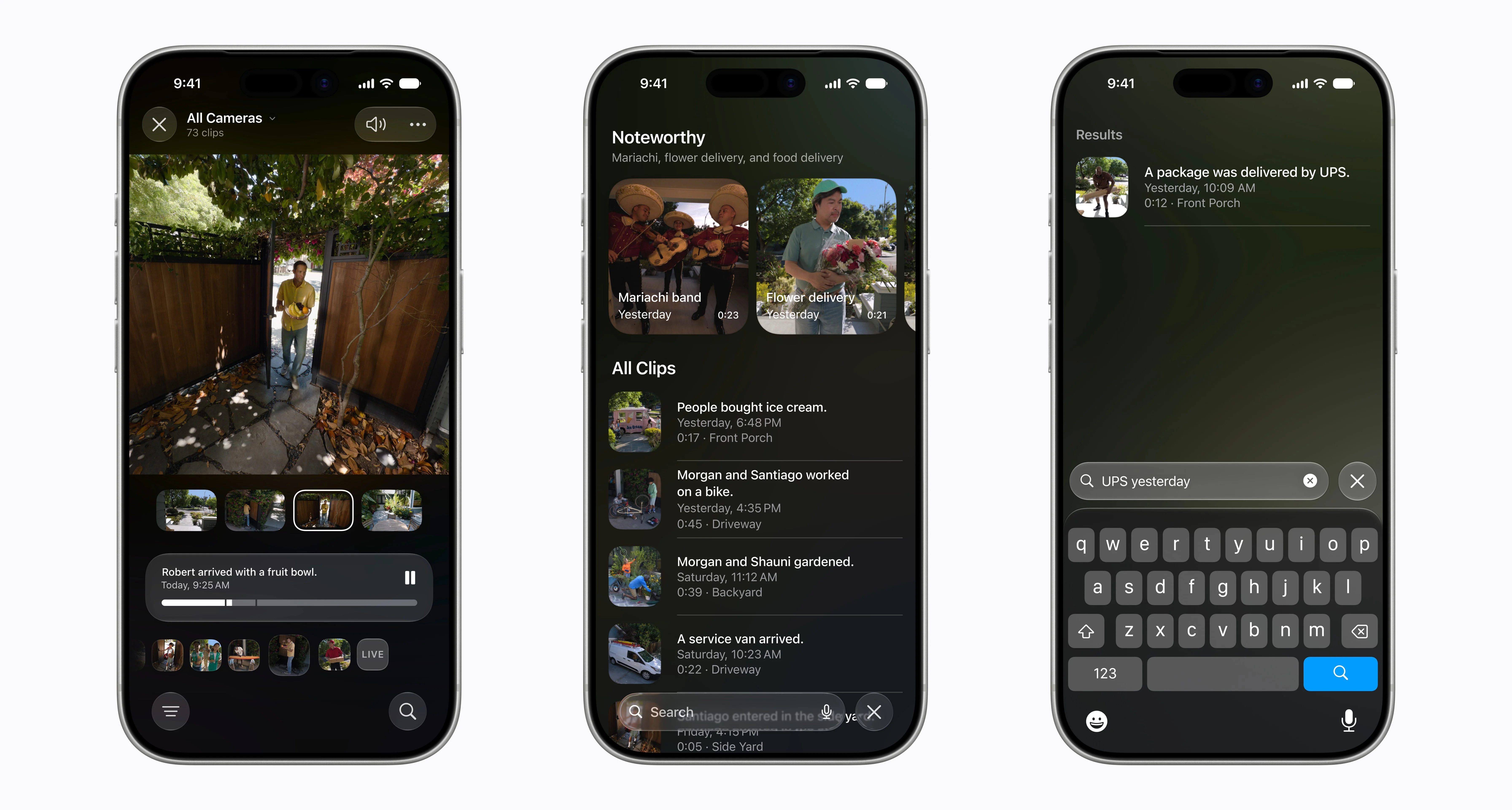
- Home groups notifications by activity, generates descriptions of camera videos, and lets you search HomeKit Secure Video clips by typing what happened.
- Files suggests smart names for files and folders.
- Accessibility improves VoiceOver with more detailed image descriptions and live recognition, adds summaries and translations in Accessibility Reader, and adds generated captions for video.
- Workout Buddy arrives in Spanish and works on the Apple Watch without the iPhone nearby.
That list is not exhaustive: Apple showed more than 250 changes across the six systems.
How much of this AI is from Google
Here is the detail most coverage misses. Every photo you edit with Apple Intelligence and every image Image Playground generates comes with a SynthID watermark, a Google DeepMind technology. It is invisible to the eye and is meant to identify that the image was altered by AI.
The problem is how durable that mark is. Apple says it withstands cropping, compression, and resizing because it is embedded in the pixels, not in metadata that disappears with a screenshot. Academic research has been showing the opposite: SynthID and similar systems can be defeated with simple manipulations such as cropping, compression, or color adjustment. And there is a gap Apple has not clarified: how that mark is read on the recipient’s side. A signal that no one can read outside the device that created it offers a weak guarantee.
The SynthID detail is part of something bigger. The models powering the new Siri were trained with technology from Google’s Gemini models, and images are marked with Google’s standard. Apple’s next-generation AI runs on pieces from the same company Apple defined itself against for a decade. How that agreement works internally is a separate story.
What you need and where it is not available
Apple Intelligence requires, at minimum, an iPhone 15 Pro or Pro Max, or any iPhone 16 or 17. The iPhone 15 and 15 Plus are left out because they use a different chip from the Pro models of that generation. iOS 27 runs starting with the iPhone 11, but those models receive the system’s performance improvements, not the AI features. The heavier features — Siri’s expressive voices, more accurate dictation — require the most advanced model: iPhone Air, iPhone 17 Pro and 17 Pro Max, plus iPad M4, Mac M3, and Vision Pro M5 with enough memory.
Language and region restrictions are more nuanced. Apple Intelligence supports 16 languages, including Spanish, while the new Siri starts only in English. Some actions, such as splitting bills with Apple Cash, are limited to the United States. And features that depend on the cloud have daily usage limits, which are higher for those who pay for iCloud+.
Conclusion
The new Siri is the headline, but the Apple Intelligence features you will touch every day are these: Photos editing, Image Playground, Visual Intelligence actions, and natural-language shortcuts. And most of them do not wait for the Siri beta or remain limited to English: they arrive with iOS 27 in September.
For anyone with an iPhone 15 Pro or later, or any 16 or 17: you will get the full platform, with or without the new Siri. For anyone with an iPhone 11 through the standard iPhone 15: iOS 27 arrives anyway, but without any of these AI features. And for everyone, the same underlying reading applies: Apple’s intelligence is no longer entirely Apple’s, and the watermark that promises to distinguish what is real from what is generated still has unanswered questions.
Author
Alexis Paez